
Ti Nspire

Science Tools Announced for TI-Nspire CX and OS 3.0

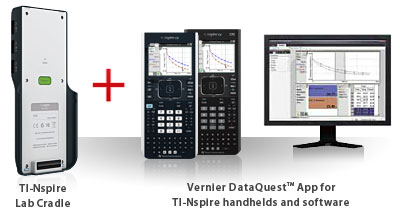
Texas Instruments didn’t stop with the announcement of the TI-Nspire CX. Now comes the announcement that users will have access to upgraded science tools for all TI-Nspire handhelds running OS 3.0. When the Nspire CX was announced a few weeks back, sharp eyed readers may have noticed a new icon at the bottom of the Nspire CX’s display, an Erlenmeyer flask. That addition is another new key feature, a fully dedicated app known as Vernier DataQuest, which allows users to collect data using a variety of scientific data collection devices.
Continue reading

Texas Instruments Strikes Back: Announces Color TI-Nspire CX

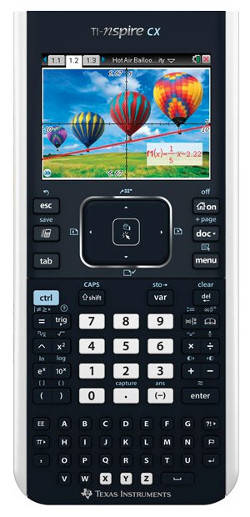
Please buy your TI-Nspire CX on Amazon . UPDATE: I have posted my TI-Nspire CX Review When I contacted Texas Instruments a few weeks back to ask about an FCC filing TI had made involving WiFi for the TI-Nspire Navigator system, I had no idea that my inquiry would lead me to a web conference with the product line strategy manager for the TI-Nspire, Mark Fry. What was being presented in the blogosphere as just an improvement to the TI-Nspire’s Navigator system turns out to be much, much more.

Continue reading

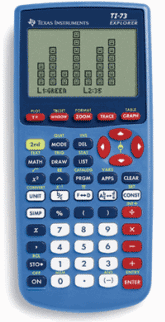
TI-73 Explorer Review

Click here to buy the TI-73 Explorer on Amazon and get free shipping. If you are looking into Texas Instruments line of graphing calculators, you’ve probably noticed that almost everything but the TI-Nspire ends with an “80-something.” Recently, I’ve reviewed the TI-83 plus, the TI-84 plus, and the TI-89 Titanium. However, there is a noticeable exception to this rule, the TI-73 Explorer. It seemed like it was time to get a TI-73 review up.

Continue reading

Math Nspired update includes Algebra II, Calculus

Texas Instruments today announced a significant update for their Math Nspired website. If you’re not familiar with Math Nspired, it’s a resource site for the TI-Nspire, primarily for math teachers, but to a lesser extent for students. There are a variety of lessons, activities, and tutorials for teachers and students on the site. This latest update is a release of resources for Algebra II and Calculus classes. Previously, all of the lessons were for Algebra I and Geometry.

Continue reading

Texas Instruments TI-Navigator Review

Click here Click here to buy the TI-Navigator on Amazon. I got a chance to check out TI-Navigator up close and personal over the weekend as part of the TI User group I’m a part of. Texas Instruments has put together an impressive product here, with far greater capabilities than I was expecting. Essentially, TI-Navigator gives a teacher the ability to connect their computer to an entire classroom of TI-84 plus or TI-Nspire calculators.

Continue reading

Video lesson: Tables on the TI-Nspire

The table feature allows you to quickly scroll the an x vs. y chart on your TI-Nspire. This can be useful as early as first year algebra for students that are just learning to graph. It’s even more helpful to calculus students using their calculator to help find a limit. The end of the video demonstrates a quick method for using the table’s “ask” feature to help find a limit.

Continue reading

Video lesson: Finding the intersection of two graphs on the TI-Nspire

In this video lesson, you’ll learn how to find the intersection of two graphs on the TI-Nspire graphing calculator. The two functions graphed here are a line and parabola, but you could use this same approach for the intersection of two lines, or virtually any functions the TI-Nspire can graph. It’s also certainly possible to have more than two functions graphed at a time. You just have to let the Nspire know which two functions you are trying to find the intersection of.

Continue reading

Video lesson: Solving polynomial equations on the TI-Nspire

When you are solving a quadratic equation, you have a lot of options. You can factor, complete the square, or use the quadratic formula. But what about polynomials with a degree (highest exponent) that is higher than two? These can be difficult to factor with the types of factoring you learn in a high school algebra class. This video lesson explains how you can use the built in features features of a TI-Nspire to solve a polynomial equation.

Continue reading

Video lesson: Definite integrals on the TI-Nspire

Teaching calculus students how to do integration goes way beyond the scope of a short article or video. The basics of taking a definite integral on the TI-Nspire, however, are pretty straightforward. This video lesson covers how to find a definite integral on a TI-Nspire both within the home screen and within a graph.

Continue reading

Video lesson: Basic graphing features of the TI-Nspire

This video lesson covers and introduction to graphing on the TI-Nspire. Inputting equations, tracing functions, and adjusting the graph window, and using zoom features are all explained as well as find a maximum, minimum, or x-intercept.

Continue reading