

Ti 84 Lessons

TI-84+C Asymptote Detection

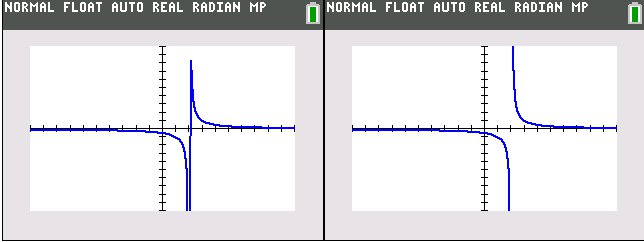
Left–TI-84+C Asymptote detection turned off. Right–Asymptote detection turned on. This isn’t at all a post I was planning to do, but again tonight I had another question on the Tech Powered Math Facebook page about the TI-84+C and asymptotes. If you press 2nd and FORMAT, you’ll find an option called “Detect Asymptotes” that can be turned on or off. The people I’ve heard from seem to assume that this feature will find and define asymptotes for users, but from my experience I don’t believe it functions this way.

Continue reading

Video Lesson: Tables on the TI-84

The table feature allows you to quickly scroll the an x vs. y chart on your TI-84. This can be useful as early as first year algebra for students that are just learning to graph. It’s even more helpful to calculus students using their calculator to help find a limit. The end of the video demonstrates a quick method for using the table’s “ask” feature to help find a limit.

Continue reading

Video lesson: Finding the intersection of two graphs on the TI-84

In this video lesson, you’ll learn how to find the intersection of two graphs on the TI-84+ graphing calculator. The two functions graphed here are a line and parabola, but you could use this same approach for the intersection of two lines, or virtually any functions the TI-84 can graph. It’s also certainly possible to have more than two functions graphed at a time. You just have to let the 84 know which two functions you are trying to find the intersection of.

Continue reading

Video lesson: Solving polynomial equations on the TI-84

When you are solving a quadratic equation, you have a lot of options. You can factor, complete the square, or use the quadratic formula. But what about polynomials with a degree (highest exponent) that is higher than two? These can be difficult to factor with the types of factoring you learn in a high school algebra class. This video lesson explains how you can use an app included with the TI-84+ Silver Edition to solve a polynomial equation.

Continue reading

Video lesson: Definite integrals on the TI-84

Teaching calculus students how to do integration goes way beyond the scope of a short article or video. The basics of taking a definite integral on the TI-84+, however, are pretty straightforward. This video lesson covers how to find a definite integral on a TI-84 plus both within the home screen and within a graph.

Continue reading

Video lesson: Basic graphing features of the TI-84

This video lesson covers and introduction to graphing on the TI-84+. Inputting equations, tracing functions, and adjusting the graph window, and using zoom features are all explained.

Continue reading

Video lesson: Imaginary and complex numbers on the TI-84+

Imaginary numbers can be a source of confusion when they are first introduced to a student, but they don’t have to be. Basically, we are trying to deal with the problem of the square root of a negative number. When we take the square root of negative one, the number is called i. This video lesson includes a brief explanation of complex numbers and a tutorial on how to use your TI-84+ to do calculations involving complex numbers.

Continue reading

Video lesson: Solving a system of equations with the TI-84+

When you are given multiple equations and multiple variables, a graphing calculator can be a lifesaver. New versions of the TI-84+ come with a pre-installed app the makes these problems a snap. This video lesson covers solving systems equations by the elimination, or linear combination method, before covering how to use the TI-84 plus to solve. The lesson does require you to have the PLYSMT2 app installed on your TI-84.

Continue reading

Video lesson: Degrees-minutes-seconds on the TI-84+

If you’re a student of geometry or trigonometry, you’ve probably come across problems involving degrees, minutes, and seconds. This is an alternative to measuring in decimal degrees, and it works a lot like time. The conversion rates are: 1 degree = 60 minutes 1 minute = 60 seconds. As a result, 1 degree = 3,600 seconds. If you want to convert from degrees, minutes, seconds to decimal degrees, you can divide by 60 and 3600 for minutes and seconds respectively.

Continue reading